

Teach Biology in UniVirtual
Free demo • No time limits or paywalls
Explore UniVirtual’s first-year Biology course in our free demo. Our interactive labs, imaginative environments, and activities are all designed to help your students understand complex concepts.
Please note: Our demo will not result in any grade or course credit. If you’re using UniVirtual as part of your university course, only download the version provided by your institution.
Biology Without Limits
Teaching biology often means working around practical constraints like limited lab space, expensive equipment, and reduced budgets. Growing class sizes can make it difficult for every student to fully participate in experiments or get the help they need during class.
UniVirtual removes those barriers.
Experience it Yourself
On our platform, lab equipment is always available, experiments can be repeated instantly and as often as is needed, and students explore exciting environments that would be impossible to recreate in a physical classroom.
UniVirtual does not replace instructors, it provides a virtual space where they can connect with their students in real time.
Experience UniVirtual Biology for yourself today!
“My students just love it. They embrace [their virtual course], spend a lot of time here, and they want to come back and do the labs over and over again!”
— Michele Yeargain, Department of Biology, University of Central Florida“This was an awesome way to learn the labs. A lot of the time I struggle to understand the processes in biology because I simply can’t imagine it. This method was a great way to resolve that problem.”
— UniVirtual Biology Student, Spring 2025“I loved using UniVirtual throughout my semester. It made learning biology more interactive and enjoyable. I hope [my university] continues using it, because it helps students understand the material on a deeper level.”
— UniVirtual Biology Student, Spring 2025What to Expect
Our demo includes the full set of environments and activities from our comprehensive introductory Biology course. You are free to move through topics and explore the environments at your own pace, though we recommend starting with “Orientation” to get to grips with traversing the virtual world!
Explore on the Macromolecular Scale
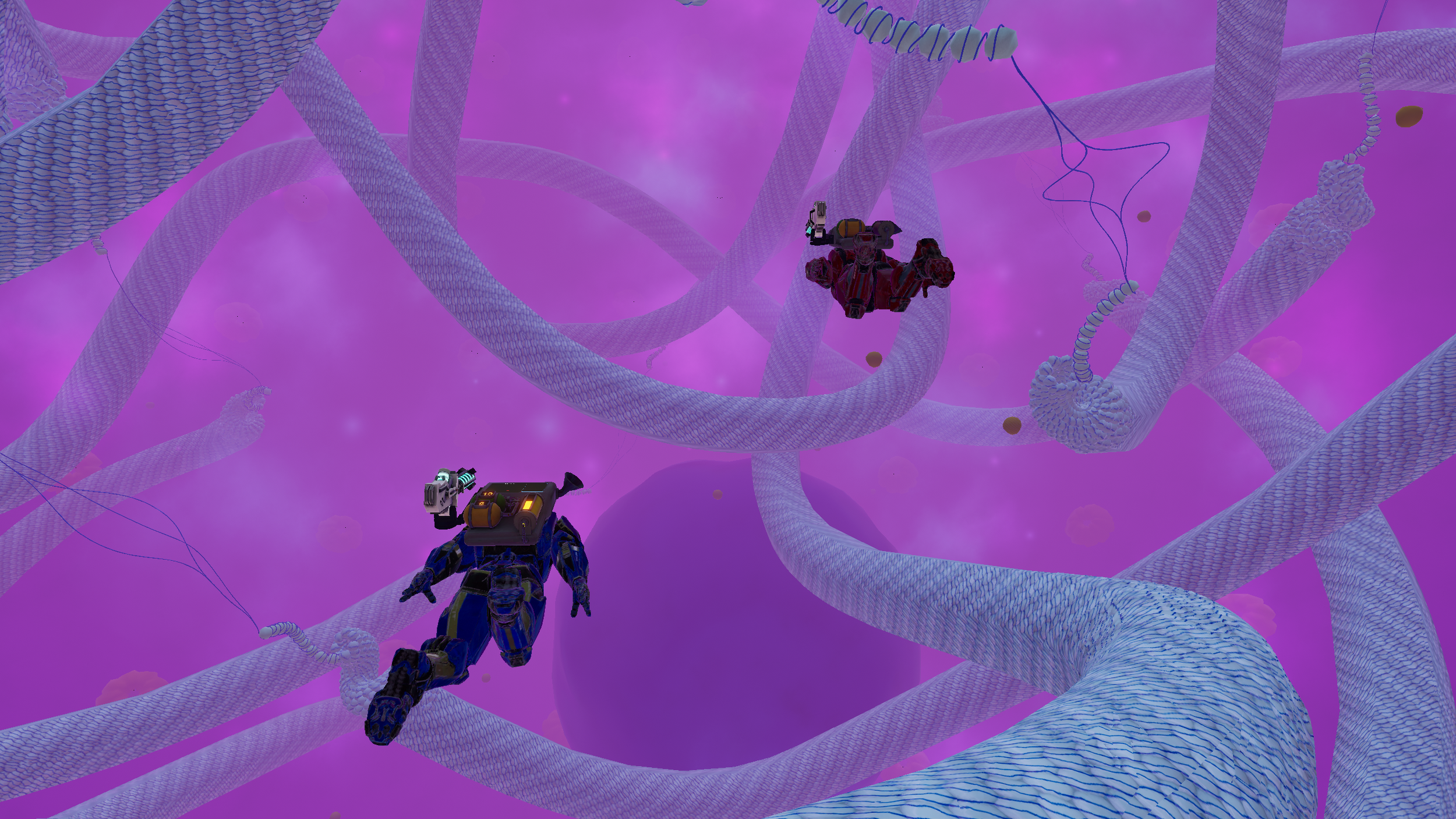
Shrink down to microscopic size and move through a giant cell environment while learning about cellular respiration and organelles.
Master Mendelian Genetics
Apply Mendelian Genetics to help restore the population of an alien species that has crash-landed on Earth.
Experiment in Virtual Bench Labs
Use equipment and undertake experiments in a fully equipped lab environment where every student has access to the tools they need.
Concepts Covered

Microscope (Compound & Dissecting)

Cellular Respiration


Mendelian Genetics

Enzymes

Osmosis & Diffusion
DNA Synthesis, Transcription, & Translation

Cellular Organelles
Mitosis & Meiosis
FAQs
-
There is no cost to institutions for adopting UniVirtual. Students pay for access how they might a textbook, at $95 per semester.
While the demo version is free to download and explore, it is intended for teachers who are interested in adding UniVirtual to their curriculum and, as such, it does not result in any course credit or grade. The demo also does not provide support, collaborative features, teacher tools, LMS features, or provide students with access to their institution’s Teaching Assistants.
If you’re a student using UniVirtual as part of your course, please do not download the demo. Instead, download the version provided by your institution.
-
Yes! UniVirtual can integrate with any existing LMS and includes an instructor dashboard that tracks student progress, participation, and lab performance. Should you wish to see how this works, get in touch and we’d be happy to show you.
-
UniVirtual runs as a desktop application and requires installation on a Windows or macOS computer. It does not run on mobile devices or in the browser.
Most modern laptops and desktop computers used for university work will run UniVirtual without issue. A stable internet connection is recommended.
You can review the full system requirements below.
Windows PC: Minimum requirements
Operating System: Windows 10 (64-bit) or later
Processor: Intel Core i5 (8th Generation, 2018) or AMD Ryzen 5 2500U
Memory: 8 GB RAM
Disk Space: 2 GB available storage
Graphics: Intel UHD Graphics 620 or AMD Radeon Vega 8 (latest drivers required)
DirectX: Version 11 or higher
Bandwidth: 10 Mbps
MacOS: Minimum requirements
Operating System: macOS Ventura (13.0) or later
Processor: Apple M1 or Intel Core i5 (8th Generation, 2018)
Memory: 8 GB RAM
Graphics: Intel UHD Graphics 620 or Apple M1 GPU
Bandwidth: 10 Mbps
-
No. UniVirtual runs on Windows and macOS computers and does not require a VR headset.
-
Currently, our demo is primarily a solo experience, though as it’s networked like our student courses, there’s a chance you’ll see others taking the demo at the same time as you.
In our live courses, students and instructors can collaborate inside the environment using voice and text chat.
-
Yes. Universities can install UniVirtual on campus computers or students can download the platform to use at home.
How the Demo Works
Get started in a few steps:
Register for the demo using your email address
Create your UniVirtual account
Download and install the UniVirtual software (Mac/PC)
Log in and begin exploring the full Biology course!
Once installed, you can access and return to the demo at any time to explore at your own pace. Our demo provides full access to the course content with no locked areas.
Please note: Our demo will not result in any grade or course credit. If you’re using UniVirtual as part of your university course, only download the version provided by your institution.
If you’re a teacher who would prefer a guided demo without downloading, book a slot with us here and our team will be happy to show you around.
Ready to Get Started?
Step into the student experience and explore UniVirtual’s first-year Biology course!
Please note: Our demo will not result in any grade or course credit.
If you’re using UniVirtual as part of your university course, only download the version provided by your institution.